Showing posts with label java. Show all posts


Data TypeDefault Value (for fields)
byte0
short0
int0
long0L
float0.0f
double0.0d
char‘u0000’
String (or any object)null
booleanfalse

Live Example : Default value of Data Type

Sample Program that will illustrate Default Value Stored in Each Primitive Data Type Variable
public class DefaultValue {
static boolean bool;
static byte by;
static char ch;
static double d;
static float f;
static int i;
static long l;
static short sh;
static String str;

public static void main(String[] args) {
System.out.println("Bool :" + bool);
System.out.println("Byte :" + by);
System.out.println("Character:" + ch);
System.out.println("Double :" + d);
System.out.println("Float :" + f);
System.out.println("Integer :" + i);
System.out.println("Long :" + l);
System.out.println("Short :" + sh);
System.out.println("String :" + str);
}
}

Output :

Bool     :false
Byte :0
Character:
Double :0.0
Float :0.0
Integer :0
Long :0
Short :0
String :null
  1. Variable names are case-sensitive.
  2. A variable’s name can be any legal identifier.
  3. It can contain Unicode letter,Digits and Two Special Characters such as Underscore and dollar Sign.
  4. Length of Variable name can be any number.
  5. Its necessary to use Alphabet at the start (however we can use underscore , but do not use it )
  6. Some auto generated variables may contain ‘$‘ sign. But try to avoid using Dollar Sign.
  7. White space is not permitted.
  8. Special Characters are not allowed.
  9. Digit at start is not allowed.
  10. Subsequent characters may be letters, digits, dollar signs, or underscore characters.
  11. Variable name must not be a keyword or reserved word.

Data type is nothing but the type of the data. Each Variable in Java must have certain type associated with it which tells us what kind of data a variable can store.

Data Types in Java Programming Language are classified into two main groups – Primitive and Reference Data Types.

A primitive Data Types are :

  1. Data types are predefined by the Java language.
  2. Predefined data types are Reserved keyword so we cannot use them as variable name inside program/application
  3. Primitive values do not share state with other primitive values.
  4. Total Number of Primitive Data Types in Java Programming is 8
  5. All Primitive Data Types have respective Wrapper Classes i.e Integer is wrapper class for primitive type int

Primitive Data Types are –

Primitive Data Types in Java :
booleancharbyteint
shortlongfloatdouble

Classification of Data Types in Java Programming Language

Data Types in Java Programming Language

Data Type and Other Details

TypeContainsDefaultSize
booleantrue or falsefalse1 bit
charUnicode Characteru000016 bits
byteSigned Integer08 bits
shortSigned Integer016 bits
intSigned Integer032 bits
longSigned Integer064 bits
floatFloating Number0.032 bit
doubleFloating Number0.064 bit

Step 1 : Checking Directory Structure

  1. After installing JDK , Restart system.
  2. Open My Computer and Check Java Installation Directory.
Checking Java Installation Directory Structure
  1. These two folders gets created inside “My Computer => C Drive => Program File => Java“.
  2. Check Inside JDK folder and look for “java” , “javac” application files.
Java Bin Directory
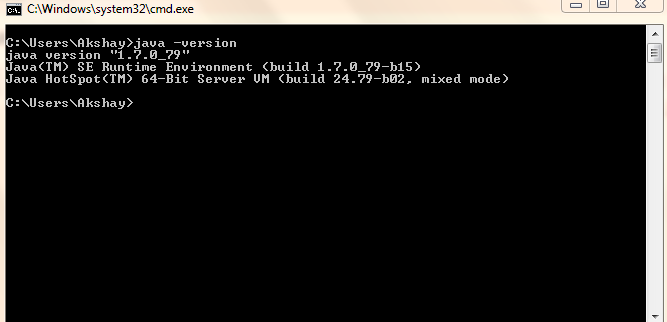
  1. If these files are present then 75% we are on right track. Now Let’s Check whether “javac” is working properly or not.
  2. Type command in cmd java -version 

Step 2 : Writing Sample Hello.java Program

  1. Create “code” folder inside C Drive. (call it as – hello.java)
  2. Copy paste following code snippet and paste into notepad. (Dont forgot to save File using .java extenstion) .
class hello
{
public static void main(String args[])
{
System.out.println("Welcome to Java");
}
}
  1. Note : Select File Type as All files.
Saving Java file
  1. Now open Command Prompt.
  2. Type following Commands.
C:>java -version //for checking version of java
C:>javac -version //checking compiler version
C:>cd code
C:code>javac hello.java
C:code>java hello
Welcome to Java
C:code>
Normally run the downloaded file and follow the step and use appropriate path.
1. Select Path
2.Complete the Installation

or copy the JRE/JDK directory in your drive, C: or D:

and run using Command Promt.
  1. Go to the Java SE Downloads Page.
  2. Scroll down a tad look for the main table with the header of "Java Platform, Standard Edition"
  3. Click the JRE Download Button (JRE is the runtime component. JDK is the developer's kit).
  4. Select the appropriate download (all platforms and 32/64 bit downloads are listed)
In Windows inorder to set
Step 1 : Right Click on MyComputer and click on properties .
Step 2 : Click on Advanced tab

alt text

Step 3: Click on Environment Variables
alt text
Step 4: Create a new class path for JAVA_HOME
alt text
Step 5: Enter the Variable name as JAVA_HOME and the value to your jdk bin path ie c:\Programfiles\Java\jdk-1.6\bin and
NOTE Make sure u start with .; in the Value so that it doesn't corrupt the other environment variables which is already set.
alt text
Step 6 : Follow the Above step and edit the Path in System Variables add the following ;c:\Programfiles\Java\jdk-1.6\bin in the value column.
Step 7 :Your are done setting up your environment variables for your Java , In order to test it go to command prompt and type

Simple :

  • Java is Easy to write and more readable and eye catching.
  • Java has a concise, cohesive set of features that makes it easy to learn and use.
  • Most of the concepts are drew from C++ thus making Java learning simpler.

Secure :

  • Java program cannot harm other system thus making it secure.
  • Java provides a secure means of creating Internet applications.
  • Java provides secure way to access web applications.

Portable :

  • Java programs can execute in any environment for which there is a Java run-time system.(JVM)
  • Java programs can be run on any platform (Linux,Window,Mac)
  • Java programs can be transferred over world wide web (e.g applets)

Object-oriented :

  • Java programming is object-oriented programming language.
  • Like C++ java provides most of the object oriented features.
  • Java is pure OOP. Language. (while C++ is semi object oriented)

Robust :

  • Java encourages error-free programming by being strictly typed and performing run-time checks.

Multithreaded :

  • Java provides integrated support for multithreaded programming.

Architecture-neutral :

  • Java is not tied to a specific machine or operating system architecture.
  • Machine Independent i.e Java is independent of hardware .

Interpreted :

  • Java supports cross-platform code through the use of Java bytecode.
  • Bytecode can be interpreted on any platform by JVM.

High performance :

  • Bytecodes are highly optimized.
  • JVM can executed them much faster .

Distributed :

  • Java was designed with the distributed environment.
  • Java can be transmit,run over internet.

Dynamic :

  • Java programs carry with them substantial amounts of run-time type information that is used to verify and resolve accesses to objects at run time.

In this tutorial we have covered step by step discussion about –

  1. Which features makes java Platform Independent ?
  2. Why Java is Platform Independent ?
  3. Why Java is considered as Secure and Portable Language ?


A. Java is considered as Portable because –

Java is Considered as Platform independent because of many different reasons which are listed below –
  1. Output of a Java compiler is Non Executable Code i.e Bytecode.
  2. Bytecode is a highly optimized set of instructions
  3. Bytecode is executed by Java run-time system, which is called the Java Virtual Machine (JVM).
[box]

Important Note :

As the output of Java Compiler is Non Executable Code we can consider it as Secure (it cannot be used for automated execution of malicious programs).
[/box]
  1. JVM is an interpreter.
  2. JVM accepts Bytecode as input and execute it.
  3. Translating a Java program into bytecode makes it much easier to run a program in a wide variety of environments because only the JVM needs to be implemented for each platform.
  4. For a given System we have Run-time package , once JVM is installed for particular system then any java program can run on it.
  5. However Internal details of  JVM will differ from platform to platformbut still all understand the Same Java Bytecode.

How Java Program is Platform Independent ?

B. Why Java Code is Safe ?

  1. Java program is executed by the JVM.
  2. The JVM prevent java code from generating side effects outside of the system.
  3. Safety is also enhanced by certain restrictions that exist in the Java language.

C. Interpreter are slower than Compiler

Java Code is Executed by JVM (interpreter).Other programming language uses compiler which can create executable code much faster then why we are using Interpreter.
  1. When a program is interpreted, it generally runs slower than the same program would run if compiled to executable code.
  2. In Java Compiler will generate ByteCode which is highly optimized.
  3. Thus running highly optimized code using interpreter makes execution ofjava program faster.
  1. Great feature of the java is that java is platform independent.
  2. It can word on any network,any operating system thus making programs more flexible.
  3. In addition to simplifying web programming in general, Java innovated a new type of networked program called the applet that changed the way the online world thought about content.
  4. Portability and Security of java makes World wide web to spread across globe.

A. Java Applets :

  1. An applet is a special kind of Java program that is designed to be transmitted over the Internet and automatically executed by a Java-compatible web browser.
  2. Applet can be downloaded on demand.
  3. Applet programs can be run on ant java compatible browser.
  4. Applets are intended to be small programs.
  5. They are typically used to display data provided by the server, handle user input, or provide simple functions, such as a loan calculator, that execute locally, rather than on the server.
  6. In essence, the applet allows some functionality to be moved from the server to the client.

B. Security :

  1. Applets can be downloaded to user PC .
  2. They are executed independently without accessing other parts of user’s PC.
  3. The ability of Java provides security and thus Java prove itself more secure.

C. Portability :

  1. Java Programming is Portable.
  2. Java Program is Operating System Independent.
  3. Java Program is converted into byte code and byte code is executed by JVM. [ See how Java Code is Portable ? ]
  4. Java Applets are thus portable and can be downloaded from any place in globe and can be executed on java compatible browser thus making java programs portable.
  1. After the creation of Java, Microsoft developed the C# language and C# is closely related to Java.
  2. Many of C#’s features directly parallel Java. Both Java and C# share the same general C++-style syntax, support distributed programming, and utilize the same object model.
  3. Though there are some differences between Java and C#, but the overall feel of these languages is very similar.
  4. If you already know C#, then learning Java will be easy and vice versa
  5. Java and C# are optimized for two different types of computing environments.
  6. C# and Java Both Languages are drew from C++.
  7. Both Languages are capable of creating cross platform portable program code.
[box]Important : How do Java & C# create cross-platform portable Code ?[/box]

Consider Scenario of Java Programming Language

  1. Java is created by Sun Micro System.
  2. Java Compiler produces Intermediate code called Byte Code.
  3. Byte Code i.e intermediate code is executed by the Run Time Environment.
  4. In Java Run Time Environment is called as “JVM” [ Java Virtual Machine]
  5. If we have JVM already installed on any platform then JVM can produce machine dependent Code based on the intermediate code.

Java Vs C Sharp

Here are some differences between Java and C Sharp.
PointJavaC#
DevelopmentSun MicrosystemMicrosoft
Development Year19952000
Data TypesLess Primitive DTMore Primitive DT
Struct ConceptNot SupportedSupported
Switch CaseString in Switch Not AllowedString in Switch Allowed
DelegatesAbsentSupported

What is Java ?

Java is widely used programming language which has wide verity of applications such as desktop applications, Mobile Applications, Enterprise applications etc.

Java is a –
  1. Class Based and Object Oriended Programming Language
  2. Computing platform
  3. Fast, Secure, and Reliable.
  4. Free
  5. General Purpose
  6. Concurrent

Five primary goals in the creation of the Java language :

  1. It should be “simple, object-oriented and familiar”.
  2. It should be “robust and secure”.
  3. It should be “architecture-neutral and portable”.
  4. It should execute with “high performance”.
  5. It should be “interpreted, threaded, and dynamic”.