Standard ContainersA container is a holder object that stores a collection of other objects (its elements). They are implemented as class templates, which allows a great flexibility in the types supported as elements.

The container manages the storage space for its elements and provides member functions to access them, either directly or through iterators (reference objects with similar properties to pointers).

Containers replicate structures very commonly used in programming: dynamic arrays (vector), queues (queue), stacks (stack), heaps (priority_queue), linked lists (list), trees (set), associative arrays (map)…

Many containers have several member functions in common, and share functionalities. The decision of which type of container to use for a specific need does not generally depend only on the functionality offered by the container, but also on the efficiency of some of its members (complexity). This is especially true for sequence containers, which offer different trade-offs in complexity between inserting/removing elements and accessing them.

stack, queue and priority_queue are implemented as container adaptors. Container adaptors are not full container classes, but classes that provide a specific interface relying on an object of one of the container classes (such as deque or list) to handle the elements. The underlying container is encapsulated in such a way that its elements are accessed by the members of the container adaptor independently of the underlying container class used.

Container class templates

Sequence containers:
array Array class (class template )vectorVector (class template )dequeDouble ended queue (class template )forward_list Forward list (class template )listList (class template )
Container adaptors:
stackLIFO stack (class template )queueFIFO queue (class template )priority_queuePriority queue (class template )
Associative containers:
setSet (class template )multisetMultiple-key set (class template )mapMap (class template )multimapMultiple-key map (class template )
Unordered associative containers:
unordered_set Unordered Set (class template )unordered_multiset Unordered Multiset (class template )unordered_map Unordered Map (class template )unordered_multimap Unordered Multimap (class template )
Other:
Two class templates share certain properties with containers, and are sometimes classified with them: bitset and valarray.

Member map

This is a comparison chart with the different member functions present on each of the different containers:

Legend:

C++98Available since C++98
C++11New in C++11

Sequence containers

Headers<array><vector><deque><forward_list><list>
Membersarrayvectordequeforward_listlist
constructorimplicitvectordequeforward_listlist
destructorimplicit~vector~deque~forward_list~list
operator=implicitoperator=operator=operator=operator=
iteratorsbeginbeginbeginbeginbegin
before_begin
begin
endendendendendend
rbeginrbeginrbeginrbeginrbegin
rendrendrendrendrend
const iteratorscbegincbegincbegincbegincbegin
cbefore_begin
cbegin
cendcendcendcendcendcend
crbegincrbegincrbegincrbegincrbegin
crendcrendcrendcrendcrend
capacitysizesizesizesizesize
max_sizemax_sizemax_sizemax_sizemax_sizemax_size
emptyemptyemptyemptyemptyempty
resizeresizeresizeresizeresize
shrink_to_fitshrink_to_fitshrink_to_fit
capacitycapacity
reservereserve
element accessfrontfrontfrontfrontfrontfront
backbackbackbackback
operator[]operator[]operator[]operator[]
atatatat
modifiersassignassignassignassignassign
emplaceemplaceemplaceemplace_afteremplace
insertinsertinsertinsert_afterinsert
eraseeraseeraseerase_aftererase
emplace_backemplace_backemplace_backemplace_back
push_backpush_backpush_backpush_back
pop_backpop_backpop_backpop_back
emplace_frontemplace_frontemplace_frontemplace_front
push_frontpush_frontpush_frontpush_front
pop_frontpop_frontpop_frontpop_front
clearclearclearclearclear
swapswapswapswapswapswap
list operationssplicesplice_aftersplice
removeremoveremove
remove_ifremove_ifremove_if
uniqueuniqueunique
mergemergemerge
sortsortsort
reversereversereverse
observersget_allocatorget_allocatorget_allocatorget_allocatorget_allocator
datadatadata

Associative containers

Headers<set><map><unordered_set><unordered_map>
Memberssetmultisetmapmultimapunordered_setunordered_multisetunordered_mapunordered_multimap
constructorsetmultisetmapmultimapunordered_setunordered_multisetunordered_mapunordered_multimap
destructor~set~multiset~map~multimap~unordered_set~unordered_multiset~unordered_map~unordered_multimap
assignmentoperator=operator=operator=operator=operator=operator=operator=operator=
iteratorsbeginbeginbeginbeginbeginbeginbeginbeginbegin
endendendendendendendendend
rbeginrbeginrbeginrbeginrbegin
rendrendrendrendrend
const iteratorscbegincbegincbegincbegincbegincbegincbegincbegincbegin
cendcendcendcendcendcendcendcendcend
crbegincrbegincrbegincrbegincrbegin
crendcrendcrendcrendcrend
capacitysizesizesizesizesizesizesizesizesize
max_sizemax_sizemax_sizemax_sizemax_sizemax_sizemax_sizemax_sizemax_size
emptyemptyemptyemptyemptyemptyemptyemptyempty
reservereservereservereservereserve
element accessatatat
operator[]operator[]operator[]
modifiersemplaceemplaceemplaceemplaceemplaceemplaceemplaceemplaceemplace
emplace_hintemplace_hintemplace_hintemplace_hintemplace_hintemplace_hintemplace_hintemplace_hintemplace_hint
insertinsertinsertinsertinsertinsertinsertinsertinsert
eraseeraseeraseeraseeraseeraseeraseeraseerase
clearclearclearclearclearclearclearclearclear
swapswapswapswapswapswapswapswapswap
operationscountcountcountcountcountcountcountcountcount
findfindfindfindfindfindfindfindfind
equal_rangeequal_rangeequal_rangeequal_rangeequal_rangeequal_rangeequal_rangeequal_rangeequal_range
lower_boundlower_boundlower_boundlower_boundlower_bound
upper_boundupper_boundupper_boundupper_boundupper_bound
observersget_allocatorget_allocatorget_allocatorget_allocatorget_allocatorget_allocatorget_allocatorget_allocatorget_allocator
key_compkey_compkey_compkey_compkey_comp
value_compvalue_compvalue_compvalue_compvalue_comp
key_eqkey_eqkey_eqkey_eqkey_eq
hash_functionhash_functionhash_functionhash_functionhash_function
bucketsbucketbucketbucketbucketbucket
bucket_countbucket_countbucket_countbucket_countbucket_count
bucket_sizebucket_sizebucket_sizebucket_sizebucket_size
max_bucket_countmax_bucket_countmax_bucket_countmax_bucket_countmax_bucket_count
hash policyrehashrehashrehashrehashrehash
load_factorload_factorload_factorload_factorload_factor
max_load_factormax_load_factormax_load_factormax_load_factormax_load_factor

 Linear Search Algorithm | Example | Time Complexity

Searching-

  • Searching is a process of finding a particular element among several given elements.
  • The search is successful if the required element is found.
  • Otherwise, the search is unsuccessful.

Searching Algorithms-

Searching Algorithms are a family of algorithms used for the purpose of searching.

The searching of an element in the given array may be carried out in the following two ways-

  1. Linear Search
  2. Binary Search

In this article, we will discuss about Linear Search Algorithm

Linear Search-

  • Linear Search is the simplest searching algorithm.
  • It traverses the array sequentially to locate the required element.
  • It searches for an element by comparing it with each element of the array one by one.
  • So, it is also called as Sequential Search.

Linear Search Algorithm is applied when-

  • No information is given about the array.
  • The given array is unsorted or the elements are unordered.
  • The list of data items is smaller.

Linear Search Algorithm-

Consider-

  • There is a linear array ‘a’ of size ‘n’.
  • Linear search algorithm is being used to search an element ‘item’ in this linear array.
  • If search ends in success, it sets loc to the index of the element otherwise it sets loc to -1.

Then, Linear Search Algorithm is as follows-

Linear_Search (a , n , item , loc)

Begin

for i = 0 to (n – 1) by 1 do

if (a[i] = item) then

set loc = i

Exit

endif

end for

set loc = -1

End

Time Complexity Analysis-

Linear Search time complexity analysis is done below-

Best case-

In the best possible case,

  • The element being searched may be found at the first position.
  • In this case, the search terminates in success with just one comparison.
  • Thus in best case, linear search algorithm takes O(1) operations.

Worst Case-

In the worst possible case,

  • The element being searched may be present at the last position or not present in the array at all.
  • In the former case, the search terminates in success with n comparisons.
  • In the later case, the search terminates in failure with n comparisons.
  • Thus in worst case, linear search algorithm takes O(n) operations.

Thus, we have-

Linear Search Efficiency-

  • Linear Search is less efficient when compared with other algorithms like Binary Search & Hash tables.
  • The other algorithms allow significantly faster searching.

Linear Search Example-

Consider-

  • We are given the following linear array.
  • Element 15 has to be searched in it using Linear Search Algorithm.

Now,

  • Linear Search algorithm compares element 15 with all the elements of the array one by one.
  • It continues searching until either the element 15 is found or all the elements are searched.

Linear Search Algorithm works in the following steps-

Step-01:

  • It compares element 15 with the 1st element 92.
  • Since 15 ≠ 92, so required element is not found.
  • So, it moves to the next element.

Step-02:

  • It compares element 15 with the 2nd element 87.
  • Since 15 ≠ 87, so required element is not found.
  • So, it moves to the next element.

Step-03:

  • It compares element 15 with the 3rd element 53.
  • Since 15 ≠ 53, so required element is not found.
  • So, it moves to the next element.

Step-04:

  • It compares element 15 with the 4th element 10.
  • Since 15 ≠ 10, so required element is not found.
  • So, it moves to the next element.

Step-05:

  • It compares element 15 with the 5th element 15.
  • Since 15 = 15, so required element is found.
  • Now, it stops the comparison and returns index 4 at which element 15 is present

1.insert an element after a given
element.

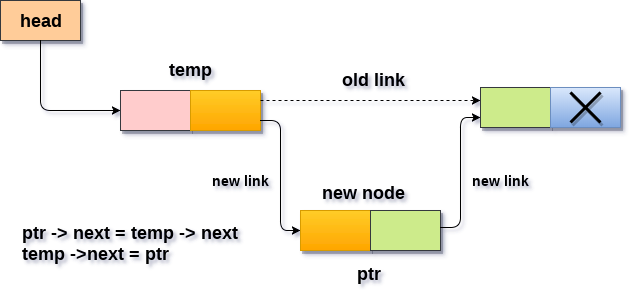
In order to insert an element after the specified number of nodes into the linked list, we need to skip the desired number of elements in the list to move the pointer at the position after which the node will be inserted. This will be done by using the following statements.

  1. emp=head;  
  2.             for(i=0;i<loc;i++)  
  3.             {  
  4.                 temp = temp->next;  
  5.                 if(temp == NULL)  
  6.                 {  
  7.                     return;  
  8.                 }  
  9.               
  10.             } 
  • Allocate the space for the new node and add the item to the data part of it. This will be done by using the following statements.
  1. ptr = (struct node *) malloc (sizeof(struct node));  
  2.         ptr->data = item;  
  • Now, we just need to make a few more link adjustments and our node at will be inserted at the specified position. Since, at the end of the loop, the loop pointer temp would be pointing to the node after which the new node will be inserted. Therefore, the next part of the new node ptr must contain the address of the next part of the temp (since, ptr will be in between temp and the next of the temp). This will be done by using the following statements.
  1. ptr→ next = temp → next   

now, we just need to make the next part of the temp, point to the new node ptr. This will insert the new node ptr, at the specified position.

  1. temp ->next = ptr;   

Algorithm

  • STEP 1: IF PTR = NULL
  • STEP 2: SET NEW_NODE = PTR
  • STEP 3: NEW_NODE → DATA = VAL
  • STEP 4: SET TEMP = HEAD
  • STEP 5: SET I = 0
  • STEP 6: REPEAT STEP 5 AND 6 UNTIL I
  • STEP 7: TEMP = TEMP → NEXT
  • STEP 8: IF TEMP = NULL
  • STEP 9: PTR → NEXT = TEMP → NEXT
  • STEP 10: TEMP → NEXT = PTR
  • STEP 11: SET PTR = NEW_NODE
  • STEP 12: EXIT
Insertion in singly linked list after specified Node

C Function

  1. #include<stdio.h>  
  2. #include<stdlib.h>  
  3. void randominsert(int);  
  4. void create(int);  
  5. struct node  
  6. {  
  7.     int data;  
  8.     struct node *next;  
  9. };  
  10. struct node *head;  
  11. void main ()  
  12. {  
  13.     int choice,item,loc;  
  14.     do   
  15.     {  
  16.         printf("\nEnter the item which you want to insert?\n");  
  17.         scanf("%d",&item);  
  18.         if(head == NULL)  
  19.         {  
  20.             create(item);  
  21.         }  
  22.         else  
  23.         {  
  24.             randominsert(item);  
  25.         }  
  26.         printf("\nPress 0 to insert more ?\n");  
  27.         scanf("%d",&choice);  
  28.     }while(choice == 0);  
  29. }  
  30. void create(int item)  
  31. {  
  32.       
  33.         struct node *ptr = (struct node *)malloc(sizeof(struct node *));  
  34.         if(ptr == NULL)  
  35.         {  
  36.             printf("\nOVERFLOW\n");  
  37.         }  
  38.         else  
  39.         {  
  40.             ptr->data = item;  
  41.             ptr->next = head;  
  42.             head = ptr;  
  43.             printf("\nNode inserted\n");  
  44.         }  
  45. }  
  46. void randominsert(int item)  
  47.     {  
  48.         struct node *ptr = (struct node *) malloc (sizeof(struct node));  
  49.         struct node *temp;  
  50.         int i,loc;  
  51.         if(ptr == NULL)  
  52.         {  
  53.             printf("\nOVERFLOW");  
  54.         }  
  55.         else  
  56.         {  
  57.               
  58.             printf("Enter the location");  
  59.             scanf("%d",&loc);             
  60.             ptr->data = item;  
  61.             temp=head;  
  62.             for(i=0;i<loc;i++)  
  63.             {  
  64.                 temp = temp->next;  
  65.                 if(temp == NULL)  
  66.                 {  
  67.                     printf("\ncan't insert\n");  
  68.                     return;  
  69.                 }  
  70.               
  71.             }  
  72.             ptr ->next = temp ->next;   
  73.             temp ->next = ptr;   
  74.             printf("\nNode inserted");  
  75.         }  
  76.           
  77.     }  

Output

Enter the item which you want to insert?
12

Node inserted

Press 0 to insert more ?
2